

Why Amigo POS Stands Out in the POS Market
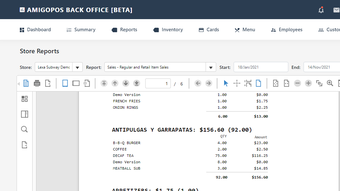
In today’s fast-paced retail and hospitality environment, having a reliable, intuitive, and feature-rich Point of Sale (POS) system is no longer optional—it’s essential. Amigo POS, developed by Advantage Retail Systems Inc., rises above the competition by combining powerful functionality with an exceptionally user-friendly interface. Unlike many POS systems that require extensive training and technical knowledge, Amigo POS is designed with simplicity in mind, allowing staff of all experience levels to get up and running in minutes. The system eliminates the need for a bulky manual, thanks to its intuitive layout and real-time guidance, making onboarding seamless for new employees. One of the most compelling aspects of Amigo POS is its versatility. Whether you're running a small café, a boutique, a restaurant, or a service-based business, this software adapts to your workflow. It supports a wide array of operations including product and service sales, table reservations, delivery and takeout order management, inventory tracking, pricing strategies, and even customer loyalty programs. With built-in reporting tools, business owners gain actionable insights into sales trends, popular items, and stock levels—enabling smarter decision-making. Another standout feature is its robust access control system. Amigo POS offers multiple authentication methods, including magnetic card readers and touch screen interfaces, ensuring secure access to sensitive data and operations. This is especially beneficial for businesses with multiple employees who require role-based permissions. Additionally, the system integrates caller ID functionality, automatically pulling up customer profiles when a call comes in—complete with personal details and past purchase history. This small but powerful feature transforms customer interactions, enabling personalized service and fostering long-term loyalty. Amigo POS also supports multi-location management, making it ideal for growing businesses. Whether you’re managing a single storefront or a chain of outlets, the software ensures consistency across all locations. With cloud-based synchronization, changes made at one site are instantly reflected everywhere else. This level of integration, combined with its affordability and ease of use, makes Amigo POS a top contender for small to mid-sized enterprises looking for a modern, scalable solution.Key Features That Make Amigo POS a Must-Have Tool
Amigo POS isn’t just easy to use—it’s packed with features that enhance efficiency, accuracy, and customer satisfaction. One of the most praised aspects is its comprehensive inventory management system. The software allows real-time tracking of stock levels, automatic low-stock alerts, and batch tracking for perishable goods. This helps prevent overstocking and stockouts, ensuring smooth operations even during peak hours. The system also supports barcode scanning, which speeds up checkout times and reduces human error. Another powerful feature is its flexible order management. Whether a customer walks in, calls in, or orders online, Amigo POS can handle all order types seamlessly. The system supports split checks, table reservations, and even kitchen display integration for restaurants. This ensures that orders are processed quickly and accurately, improving service speed and reducing mistakes. For delivery-focused businesses, the software includes built-in route optimization and delivery status tracking, keeping both staff and customers informed. Customer relationship management (CRM) is another highlight. Amigo POS stores detailed customer profiles, including purchase history, preferences, and contact information. This data can be used to send targeted promotions, birthday discounts, or loyalty rewards—boosting repeat business. The system also supports email and SMS marketing automation, making it easy to stay in touch with your clientele. The reporting and analytics suite is equally impressive. With customizable reports on sales, taxes, employee performance, and inventory turnover, business owners can monitor KPIs at a glance. These reports can be exported to PDF or Excel, making it simple to share with accountants or investors. Security is also a top priority: data encryption, automatic backups, and multi-level user permissions ensure your business information stays safe and compliant. Additionally, Amigo POS supports multiple payment methods, including credit/debit cards, mobile wallets, and cash. The system integrates with popular payment gateways and supports offline mode—so you’re never locked out during internet outages. With regular updates and a responsive support team, Amigo POS continues to evolve, ensuring long-term value for users.Installation & Usage: Getting Started in Minutes
Setting up Amigo POS is straightforward, whether you're using a Windows PC, Mac, Android tablet, or iOS device. The software is available for download from the official Advantage Retail Systems Inc. website, and the installation process is intuitive and guided. Once downloaded, simply run the installer and follow the on-screen prompts. The setup wizard walks you through essential configurations such as business name, tax settings, payment methods, and employee roles. After installation, the real magic begins with the onboarding tutorial. Amigo POS includes a built-in walkthrough that demonstrates core functions like creating a new sale, applying discounts, managing inventory, and generating reports. This interactive guide ensures that even first-time users feel confident from day one. For businesses using hardware like receipt printers, barcode scanners, or cash drawers, Amigo POS supports plug-and-play integration. Most devices are automatically detected, and drivers are included in the software package. If needed, the support team provides detailed setup guides and video tutorials. Once configured, using Amigo POS is a breeze. The dashboard presents a clean, customizable interface with quick-access buttons for sales, inventory, reports, and settings. Employees can log in with their unique credentials, and each user’s access level is determined by their role—managers, cashiers, and supervisors all have tailored views and permissions. The system also supports multi-terminal setups, allowing multiple staff members to work simultaneously across different devices. All transactions sync in real time, so there’s no risk of duplicate sales or data loss. For remote access, the cloud-based version allows you to manage your business from anywhere with an internet connection. Regular updates are delivered automatically, ensuring you always have the latest features and security patches. The software is designed to minimize downtime, with minimal maintenance required. Whether you’re a solo entrepreneur or managing a team, Amigo POS streamlines daily operations and frees up time for what truly matters—growing your business.Compatibility & System Requirements
Amigo POS is designed for maximum accessibility and flexibility, supporting a wide range of devices and operating systems. Whether you're using a desktop, tablet, or mobile device, you can find a version of Amigo POS that fits your needs. The software is compatible with Windows 10 and later, macOS 10.15 (Catalina) and newer, Android 8.0 and above, and iOS 13 and later. This broad compatibility ensures that businesses can use their existing hardware or invest in cost-effective devices without worrying about software limitations. For businesses that prefer a desktop solution, the Windows and Mac versions offer full-featured functionality with support for external hardware like receipt printers, cash drawers, barcode scanners, and magnetic card readers. The Android and iOS versions are ideal for mobile POS setups, allowing staff to take orders directly at tables or on the shop floor using tablets or smartphones. System requirements are modest, making Amigo POS suitable for both high-end and budget-friendly devices. A minimum of 2GB RAM, 1GB free disk space, and a stable internet connection are recommended. The software also supports offline mode, so transactions can continue during internet outages—data will sync once connectivity is restored. Cloud-based hosting is available for users who prefer not to manage local servers. This option includes automatic backups, remote access, and enhanced security protocols. For businesses with sensitive data, on-premise deployment is also supported, giving you full control over your information. With its cross-platform compatibility and flexible deployment options, Amigo POS adapts to your business model—whether you're a brick-and-mortar store, a food truck, or a multi-location chain.Pros and Cons: A Balanced View of Amigo POS
- Pros:
- Intuitive, user-friendly interface with no manual required
- Supports multiple platforms: Windows, Mac, Android, iOS
- Comprehensive inventory and order management
- Advanced CRM with caller ID and customer history
- Secure access with card readers and role-based permissions
- Cloud and on-premise deployment options
- Regular free updates and responsive customer support
- Multi-location management and real-time sync
- Cons:
- Advanced features may require a learning curve for new users
- Some hardware integrations may need additional setup
- Mobile version lacks some desktop-specific tools
- Customer support response time can vary during peak hours
- Initial setup may require technical assistance for complex configurations
Frequently Asked Questions (FAQ)
-
Is Amigo POS free to download and use?
Yes, Amigo POS offers a free download with a fully functional trial version. While basic features are available at no cost, advanced tools like multi-location support and cloud hosting may require a subscription. The trial allows you to test all features before committing.
-
Can I use Amigo POS on my Android or iOS device?
Absolutely. Amigo POS has dedicated apps for Android and iOS, enabling you to run a mobile POS system using tablets or smartphones. These apps support all core functions, including sales, inventory, and customer management.
-
Does Amigo POS support barcode scanning?
Yes, Amigo POS fully supports barcode scanning via integrated or external scanners. This speeds up checkout, reduces errors, and improves overall efficiency.
-
How secure is my data with Amigo POS?
Amigo POS uses end-to-end encryption, automatic backups, and role-based access control to protect your data. Cloud-hosted versions include additional security layers like SSL and firewall protection.
-
Can I manage multiple locations with Amigo POS?
Yes, Amigo POS supports multi-location management with real-time synchronization across all sites. This makes it ideal for growing businesses with multiple outlets.







